
Codex Usage Limits, Explained by Someone Who Hit Zero
On 18 July 2026 I emptied a weekly Codex pool before lunch — two hundred-plus subagents, one shared quota, a reset seven days out. I wrote up the mechanics in Open Harness. This is the follow-up: what "Codex usage limits" actually cover once you read OpenAI's own pages instead of the forum threads, why my content-production agents were quietly on the wrong side of that line, and the move that fixed it — running the same agents in regular ChatGPT chat, with a self-hosted MCP server doing the work, which draws from a different limit entirely.
Screenshots are from my own workspace, dated 28–29 August 2026. Limits change; the shape of the problem does not.
Two pools, not one
The single most useful fact, and the one most people get wrong: Codex and regular ChatGPT chat have separate limits. Open Codex → Settings → Analytics and the sentence under "Balance" reads "Codex and Work share the same usage limit." OpenAI's help pages say the rest: Codex, ChatGPT Work, ChatGPT for Excel, and Workspace Agents all draw from the same allowance, and "Work follows the same usage structure as Codex." Everyday chat is a different bucket, with its own per-model rules — and on several plans plain text chat is now described as unlimited subject to abuse safeguards, while reasoning, uploads, images, voice and data analysis carry their own limits.
                 ┌─ Codex CLI
                 ├─ Codex IDE / desktop app
Agentic pool ────┼─ ChatGPT Work
(5h + weekly)    ├─ ChatGPT for Excel
                 └─ Workspace Agents

ChatGPT chat ──── separate limits (per model / per feature)
So the old forum summary — "Work → same limit as Codex, Chat → different limit" — is right. The part that has aged is "and hidden": chat limits are documented per model and plan now. What matters for anyone running agents is the line between the two boxes, because which box your work lands in is a configuration decision, and I had made it badly.
What the agentic pool looks like from inside
Two rolling windows, both shared across every surface in the top box:
- A 5-hour usage limit. Mine read 38% remaining, resetting 4:28 PM — five hours after the window opened, not the top of the hour.
- A weekly usage limit. Mine read 32% remaining, resetting 3 September, 11:25 PM — seven days after the week started.
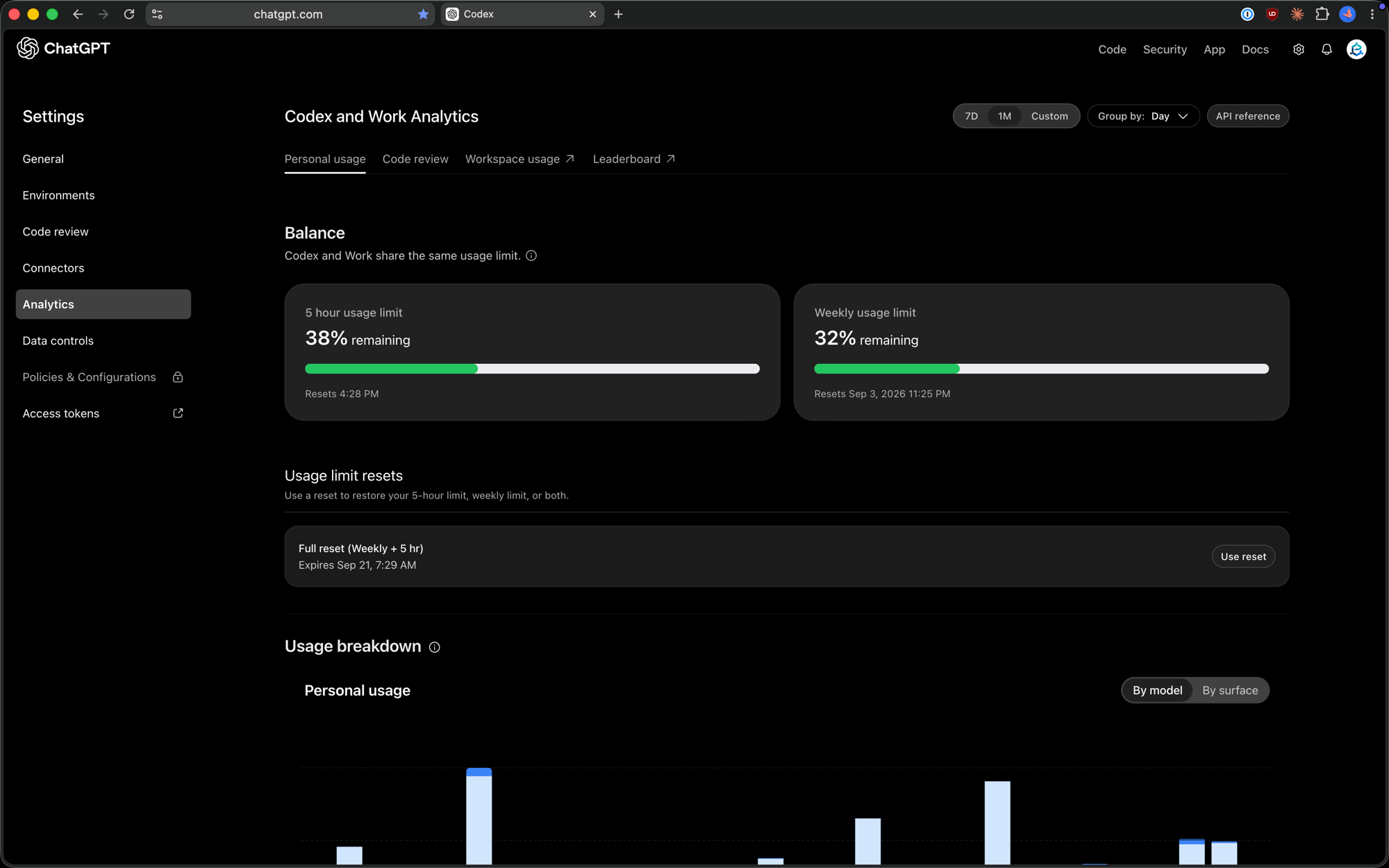
Three things people search for that this screen settles:
- "Codex token limit per day." There is no daily token cap. The pool is measured in usage, not tokens, and the windows are 5 hours and 7 days. OpenAI is explicit that a long Work or Codex task can consume far more allowance than a short one, depending on model, complexity, context, reasoning, tools, and where it runs.
- "ChatGPT Plus Codex limits" vs Pro vs Business. Every plan gets the same two windows; plans differ in how much fits inside them. The numbers move — read the help page and note the date.
- "Codex rate limit reset" / "Codex reset usage." As of late August 2026 there is a manual reset: a "Full reset (Weekly + 5 hr)" grant on the Analytics page with a "Use reset" button, expiring 21 September in my case. It is a one-shot. If you don't see it, nothing in the CLI will create it. Otherwise the reset is the timestamp on the card, and it rolls.
How to check usage — and which screen measures what
- Codex → Settings → Analytics → Personal usage. The only screen that shows the agentic-pool limit as a percentage with a reset time. Toggle "By surface" to see whether the drain is CLI, web, or cloud tasks.
- The CLI.
/statusin a Codex session prints the same two windows. Fine inside a long run; useless for agents you don't sit in front of. - Admin Console → Analytics → Usage (workspace plans). Counts tokens and messages across Chat, Codex and Work — not limit percentage — and lags: tokens "Updated Aug 29, 3:00 AM UTC", messages "Aug 28, 7:09 AM UTC". It is the place to see who and which surface is spending. It cannot tell you how close the pool is to the wall.
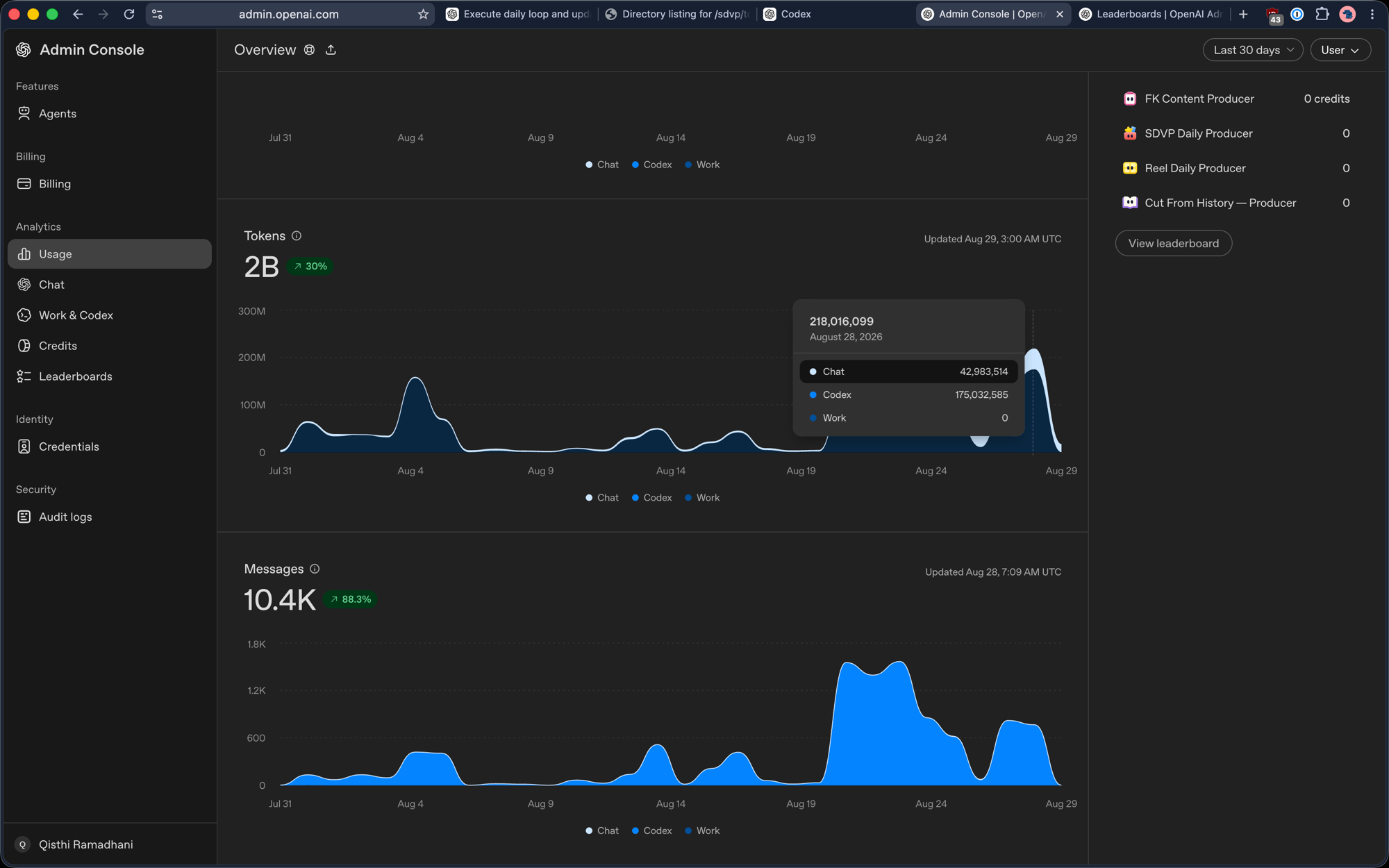
The trap is reading the Admin Console as a budget. Two billion tokens in 30 days says nothing about whether the weekly window is at 90% or 9%. But the split is exactly what you need for the next section: it tells you how much of your spend is sitting in the agentic box that has a wall, versus the chat box that mostly doesn't.
My content agents were in the wrong box
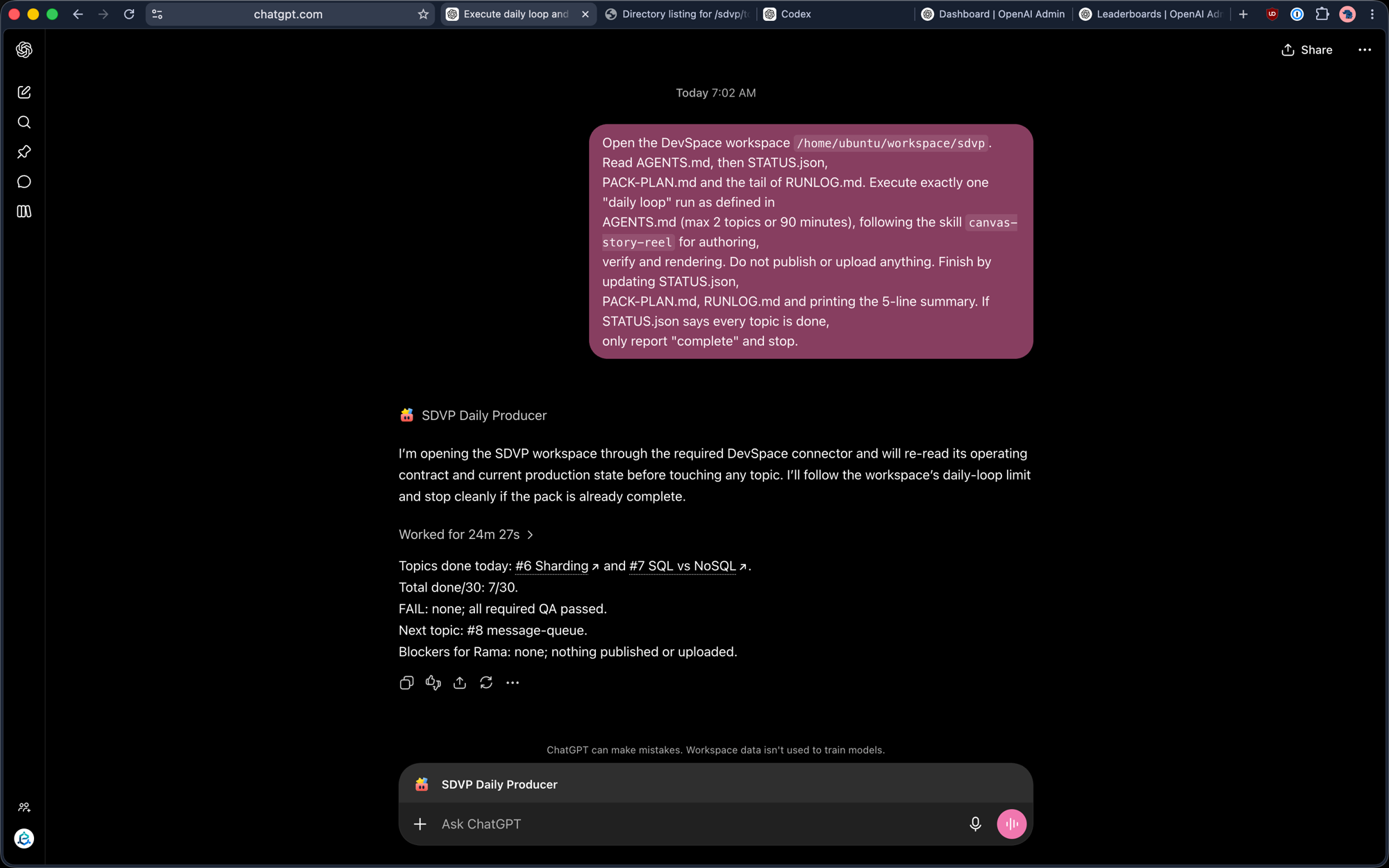
I run four "producers": each opens a workspace on my own server through an MCP connector, reads its operating contract, does a bounded amount of authoring, verifying and rendering, and writes state back. Here is one run of SDVP Daily Producer, a 30-topic system-design video series:
And here is what a month of the four looks like on the Admin Console leaderboard:
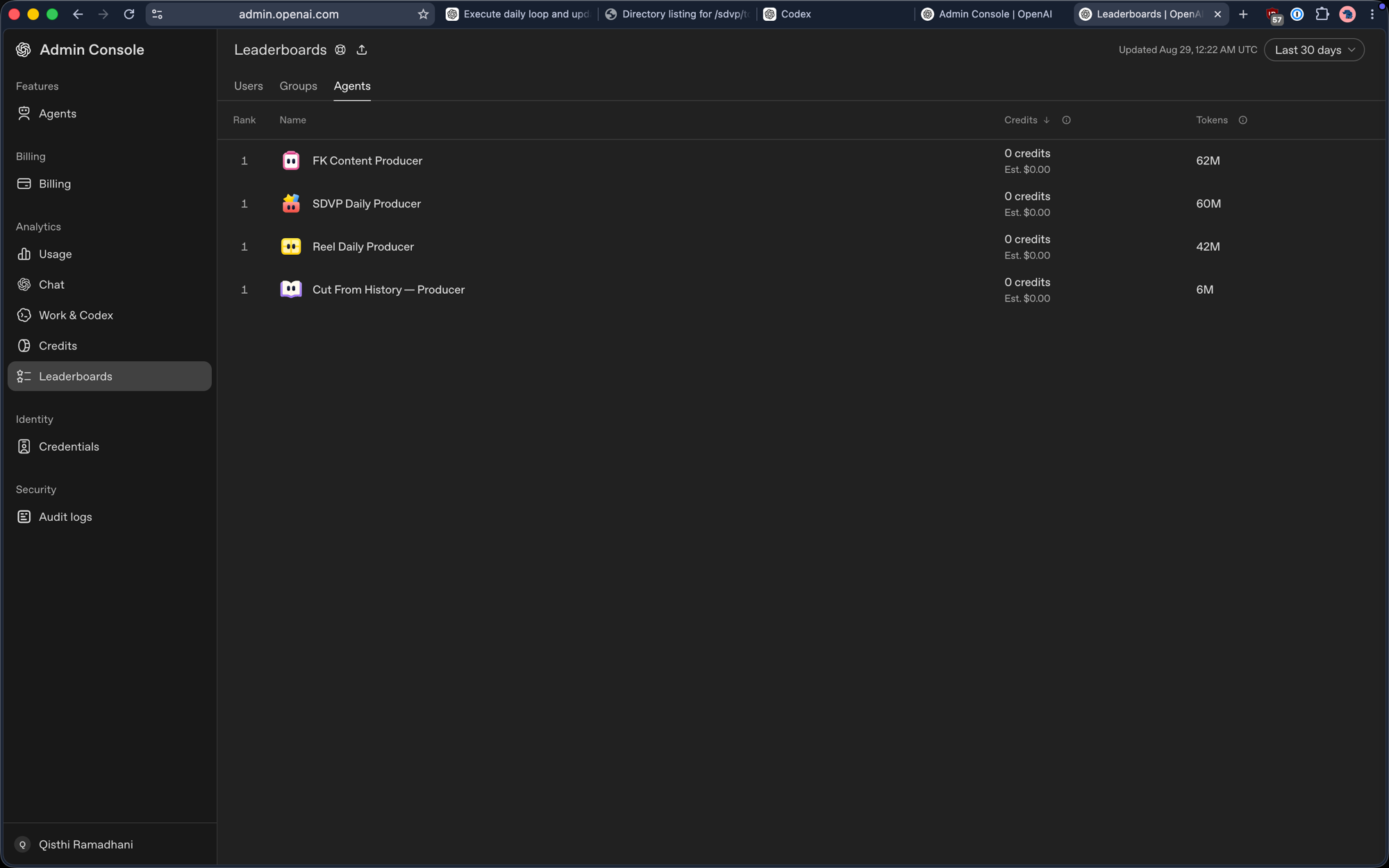
| Agent | Tokens / 30 days | Share |
|---|---|---|
| FK Content Producer | 62M | 36% |
| SDVP Daily Producer | 60M | 35% |
| Reel Daily Producer | 42M | 25% |
| Cut From History — Producer | 6M | 4% |
None of this work needs Codex. It is not editing a repository, running tests, or opening pull requests. It is reading a few Markdown files, writing scenes, and calling a render tool — and every one of those calls happens on my server, through MCP. The only reason it was charged to the agentic pool is that I had built the producers as workspace agents, which OpenAI counts alongside Codex and Work. Same prompt, same connector, same output; wrong bucket.
Content agents are the worst tenant for a pooled weekly limit because they are scheduled. A coding session ends when you get up; a daily producer fires whether or not the 5-hour window is already at 10%, and four of them in the same hour is the July incident with a calendar attached.
The move: Codex → chat + a self-hosted MCP server
The fix was not a budget rule. It was moving the producers from the top box to the bottom one:
- Put the tools on your own machine. A small VPS runs an MCP server that exposes exactly what the producers need: read/write inside one workspace directory, and a handful of named commands (verify, render). Nothing else — no shell, no network. It sits behind a reverse proxy with authentication.
- Add it to ChatGPT as a connector (Settings → Connectors), and turn it on for a regular Project — not a Work task, not a workspace agent.
- Run the same prompt in ordinary chat. The prompt in the screenshot above is unchanged: open workspace, read state, one bounded loop, publish nothing, write state back. The model reasons in chat; the MCP server does the work.
- Keep Codex for Codex. Repository edits, tests, PRs — things that genuinely need a sandbox with a checkout — stay on the agentic pool, which is now mostly empty.
What changes in practice:
- The weekly Codex bar stops moving on content days. On the 28 August chart, 175M of 218M tokens were on the Codex line; the same work in chat lands on the Chat line, which does not have the seven-day wall.
- You lose the Work sandbox — file uploads live in the chat, not on the server, so the prompt has to say "read attachments from the conversation, never through the MCP" explicitly.
- Chat has its own ceilings. Manually-selected reasoning has its own allowance; per-model rules apply (GPT-5.6 in ChatGPT is documented separately). Long producer runs at high reasoning effort are not free — they are just not pooled with your coding.
- Tokens are still tokens. The Admin Console will keep counting them; if you are on a metered plan, the bill does not care which box. What you bought is isolation: a runaway producer can no longer lock you out of Codex for a week.
Rules that still matter after the move
The July principle holds — a budget rule enforced by prose is a suggestion; a budget rule enforced by an exit code is a budget. Chat has no exit codes, so the enforcement lives in the prompt and the MCP server.
1. The prompt states the ceiling in the agent's own units
"Exactly one daily loop, max 2 topics or 90 minutes." In the prompt, not only in AGENTS.md — instruction files are read at the start and forgotten under pressure; the prompt is re-read at every decision.
2. Read the tail, not the file
"Read the tail of RUNLOG.md." Long-context reads are the silent cost in content pipelines. A 30-topic log read in full on every run dominates the bill by week two. The MCP server enforces this too: its read tool has a size cap.
3. "Done" costs one file read
"If STATUS.json says every topic is done, only report complete and stop." Idempotent runs mean a mis-scheduled second trigger is a file read, not a re-render.
4. The server is the sandbox now
The MCP exposes one directory root and a fixed command list. The agent cannot publish, upload, or reach the network, because the server has no tool for it. Whatever the model decides, the blast radius is one workspace.
5. Codex stays for Codex
Anything that needs a checkout and a test runner goes to the agentic pool, staggered so no two runs share a 5-hour window, and never after the weekly bar drops under 20%. Everything else — research, drafting, repurposing, rendering — is chat + MCP.
When the pool is gone anyway
- Use the reset, if you have one. The "Full reset (Weekly + 5 hr)" grant restores both windows immediately. Spend it on a workday morning, not a Friday night; it does not come back.
- Wait for the timestamp. The reset time on the card is exact. Nothing in the CLI, the app, or support moves it.
- Move the work, not the plan. Upgrading mid-week does not refund the burned window. Moving non-coding work to chat + MCP does — and it is permanent.
- Don't retry.
429 usage_limit_reachedis deterministic. Scheduled runs must treat it as "stop until reset", log it, and exit.
The checklist
[ ] Know the two boxes: Codex/Work/Excel/Workspace Agents = one pool; chat = separate
[ ] Admin Console: is your spend on the Codex line or the Chat line?
[ ] Anything that doesn't need a repo sandbox → regular chat + self-hosted MCP
[ ] MCP exposes one workspace root + fixed commands; no shell, no network, no publish
[ ] Producer prompts state the ceiling in their own units (topics / minutes)
[ ] Read the TAIL of logs; size-cap the read tool server-side
[ ] "Done" path = one file read, then stop
[ ] Codex runs staggered across 5-hour windows; none under 20% weekly remaining
[ ] 429 usage_limit_reached = stop until reset, logged, never retried
[ ] Analytics page open for the pool %, Admin Console for the split — both, always
The dashboard tells you where you are. The connector decides which limit you are drawing from. The prompt tells the agent where it may go. After July I track one metric: whether the Codex weekly bar moved on a day I wrote no code. Since the move, it hasn't.